
SEN5X and SEN6X Series Environmental sensor
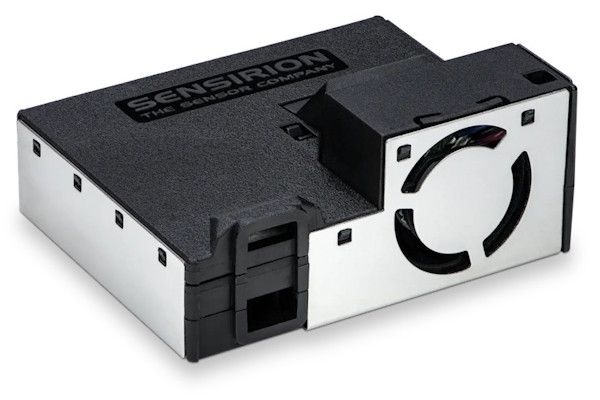
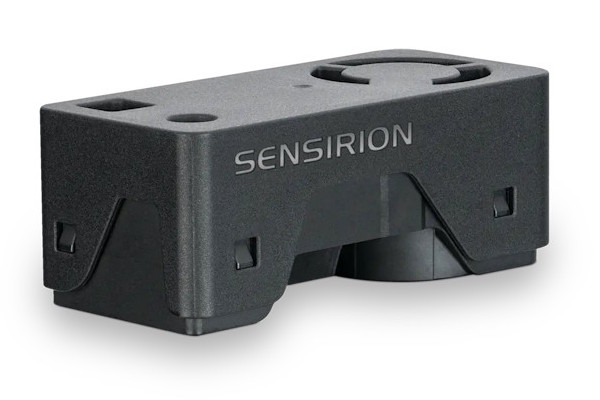
The sen5x sensor platform allows you to use Sensirion
SEN5X Series and
SEN6X Series
Environmental sensors with ESPHome.
The I²C Bus is required in your configuration for this sensor to work. This sensor supports both UART and I²C communication. Only I²C communication is implemented in this component.
SEN5X Series

# Example SEN55 configuration entry
sensor:
  - platform: sen5x
    id: my_sen55
    type: SEN55
    temperature_compensation:
      offset: 0.0
      normalized_offset_slope: 0.0
      time_constant: 0
    acceleration_mode: low
    store_baseline: true
    auto_cleaning_interval: 604800
    pm_1_0:
      name: "PM <1µm Mass concentration"
    pm_2_5:
      name: "PM <2.5µm Mass concentration"
    pm_4_0:
      name: "PM <4µm Mass concentration"
    pm_10_0:
      name: "PM <10µm Mass concentration"
    temperature:
      name: "Temperature"
    humidity:
      name: "Humidity"
    voc:
      name: "VOC"
    nox:
      name: "NOx"
SEN6X Series
# Example SEN66 configuration entry
sensor:
  - platform: sen5x
    id: my_sen66
    type: SEN66
    temperature_compensation:
      offset: 0.0
      normalized_offset_slope: 0.0
      time_constant: 0
    store_baseline: true
    pm_1_0:
      name: "PM <1µm Mass concentration"
    pm_2_5:
      name: "PM <2.5µm Mass concentration"
    pm_4_0:
      name: "PM <4µm Mass concentration"
    pm_10_0:
      name: "PM <10µm Mass concentration"
    temperature:
      name: "Temperature"
    humidity:
      name: "Humidity"
    voc:
      name: "VOC"
    nox:
      name: "NOx"
    co2:
      name: "CO₂"
Configuration variables
type (Required, enum): The type of the connected sensor. Must be one of the following: SEN50, SEN54, SEN55, SEN62, SEN63C, SEN65, SEN66, SEN68 or SEN69C.
- All options from Sensor.
pm_1_0 (Optional): The information for the Mass Concentration sensor for fine particles up to 1μm in size. Readings in µg/m³.
- All options from Sensor.
pm_2_5 (Optional): The information for the Mass Concentration sensor for fine particles up to 2.5μm in size. Readings in µg/m³.
- All options from Sensor.
pm_4_0 (Optional): The information for the Mass Concentration sensor for coarse particles up to 4μm in size. Readings in µg/m³.
- All options from Sensor.
pm_10_0 (Optional): The information for the Mass Concentration sensor for coarse particles up to 10μm in size. Readings in µg/m³.
- All options from Sensor.
temperature (Optional): The information for the Temperature sensor. Only available with SEN54, SEN55, SEN62, SEN63C, SEN65, SEN66, SEN68 or SEN69C.
- All options from Sensor.
humidity (Optional): The information for the Relative Humidity sensor. Only available with SEN54, SEN55, SEN62, SEN63C, SEN65, SEN66, SEN68 or SEN69C.
- All options from Sensor.
co2 (Optional): The information for the Carbon dioxide (CO₂) sensor. Readings in ppm. Only available with SEN63C, SEN66 or SEN69C.
- auto_self_calibration (Optional, boolean): True enables automatic CO₂ self calibration.
False disables automatic CO₂ calibration. Default is
true. - altitude_compensation (Optional, integer): When set to altitude (in meters), the CO₂ sensor will be statically compensated for deviations due to current altitude. See CO₂ Compensation section below for more information.
- ambient_pressure_compensation (Optional, integer): When set to pressure (in hPA), the CO₂ sensor will be compensated for deviations due to ambient pressure. See CO₂ Compensation section below for more information.
- ambient_pressure_compensation_source (Optional, ID): Sets an external pressure sensor ID (must report in hPA). This will compensate the CO₂ sensor for deviations due to current pressure. This correction is applied with each update of the CO₂ sensor. See CO₂ Compensation section below for more information.
- All options from Sensor.
- auto_self_calibration (Optional, boolean): True enables automatic CO₂ self calibration.
False disables automatic CO₂ calibration. Default is
voc (Optional): The information for the VOC Index sensor. Only available with SEN54, SEN55, SEN65, SEN66, SEN69 or SEN69C.
algorithm_tuning (Optional): The VOC algorithm can be customized by tuning 6 different parameters. For more details see Engineering Guidelines for SEN5x.
- index_offset (Optional): VOC index representing typical (average) conditions. Allowed values are in range 1..250. The default value is 100.
- learning_time_offset_hours (Optional): Time constant to estimate the VOC algorithm offset from the history in hours. Past events will be forgotten after about twice the learning time. Allowed values are in range 1..1000. The default value is 12 hour.
- learning_time_gain_hours (Optional): Time constant to estimate the VOC algorithm gain from the history in hours. Past events will be forgotten after about twice the learning time. Allowed values are in range 1..1000. The default value is 12 hours.
- gating_max_duration_minutes (Optional): Maximum duration of gating in minutes (freeze of estimator during high VOC index signal). Zero disables the gating. Allowed values are in range 0..3000. The default value is 180 minutes.
- std_initial (Optional): Initial estimate for standard deviation. Lower value boosts events during initial learning period, but may result in larger device-to-device variations. Allowed values are in range 10..5000. The default value is 50.
- gain_factor (Optional): Gain factor to amplify or to attenuate the VOC index output. Allowed values are in range 1..1000. The default value is 230.
All options from Sensor.
nox (Optional): NOx Index. Only available with SEN55, SEN65, SEN66, SEN69 or SEN69C.
algorithm_tuning (Optional): Like VOC the NOx algorithm can be customized by tuning 5 different parameters.
- index_offset (Optional): NOx index representing typical (average) conditions. Allowed values are in range 1..250. The default value is 100.
- learning_time_offset_hours (Optional): Time constant to estimate the NOx algorithm offset from the history in hours. Past events will be forgotten after about twice the learning time. Allowed values are in range 1..1000. The default value is 12 hour.
- learning_time_gain_hours (Optional): Here for completeness, but this is ignored by NOx Algorithm Tuning.
- gating_max_duration_minutes (Optional): Maximum duration of gating in minutes (freeze of estimator during high NOx index signal). Zero disables the gating. Allowed values are in range 0..3000. The default value is 180 minutes.
- std_initial (Optional): Here for completeness, but this is ignored by NOx Algorithm Tuning.
- gain_factor (Optional): Gain factor to amplify or to attenuate the NOx index output. Allowed values are in range 1..1000. The default value is 230.
All options from Sensor.
hcho (Optional): The information for the Formaldehyde (HCHO) sensor. Readings in ppb. Only available with SEN68 or SEN69C.
- All options from Sensor.
store_baseline (Optional, boolean): When set to
truethe VOC algorithm state is saved to flash every 2 hours. During setup of the sensor the previously saved algorithm state is loaded and the VOC sensor will skip the initial learning phase. Only available with SEN54, SEN55, SEN65, SEN66, SEN68 or SEN69C.auto_cleaning_interval (Optional, positive int): The periodic fan-cleaning interval in seconds. Only available with SEN55, SEN54 OR SEN55.
temperature_compensation (Optional, sequence): These parameters allow the user to compensate temperature effects of the customer design by applying custom temperature offsets to the ambient temperature. Only available with SEN54, SEN55, SEN62, SEN63C, SEN65, SEN66, SEN69 or SEN69C. See Temperature Compensation section below for more information.
- offset (Optional, float): Temperature offset, in °C. Defaults to
0. - normalized_offset_slope (Optional, float): Normalized temperature offset slope. Defaults to
0. - time_constant (Optional, positive int): Time constant in seconds. Defaults to
0.
- offset (Optional, float): Temperature offset, in °C. Defaults to
acceleration_mode (Optional): Allowed value are
low,mediumandhigh. Defaults tolow. Only available with SEN54 or SEN55.By default, the RH/T acceleration algorithm is optimized for a sensor which is positioned in free air. If the sensor is integrated into another device, the ambient RH/T output values might not be optimal due to different thermal behavior.
This parameter can be used to adapt the RH/T acceleration behavior for the actual use-case, leading in an improvement of the ambient RH/T output accuracy. There is a limited set of different modes available. Medium and high accelerations are particularly indicated for air quality monitors which are subjected to large temperature changes. Low acceleration is advised for stationary devices not subject to large variations in temperature.
For more information see Temperature Acceleration and Compensation Instructions for SEN5x..
address (Optional, int): Manually specify the I²C address of the sensor. Defaults to
0x69for SEN5X sensors and0x6Bfor SEN6X sensors.
ℹ️ Note
This component reports readings as soon as they are available without regard initial accuracy. Your configuration should limit reporting of sensor values for a period of time after power-up. A good starting point is 5 minutes.
- The PM sensor has a start-up time of 30 seconds.
- The temperature sensor has a response time of 1 minute with no mention start-up time.
- The humidity sensor has a response time of 20 seconds with no mention start-up time.
- The VOC sensor will start detecting events in 1 minute but may take up to 1 hour to meet data sheet specifications.
- The NOx sensor will start detecting events in 5 minutes but may take up to 6 hours to meet data sheet specifications.
- The CO₂ sensor has a response time of between 60 and 70 seconds with no mention start-up time.
- The HCHO sensor has a start-up time of 10 minutes.
Wiring
The both sensor series use a JST GHR-06V-S 6 pin type connector, with a 1.25mm pitch. The cable needs this connector:
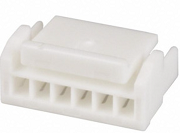
The SEN5X series operates at 5V and must have pin no.5 shorted to GND. This forces the sensor into I²C mode. I²C is the only mode supported by this component.
The SEN6X series operates at 3.3V and only supports I²C mode.
For better stability, the SDA and SCL lines require suitable pull-up resistors.
Actions
Multiple actions are available with this component and all are mutually exclusive. Actions take time to complete. While an individual action is running the sensor is otherwise occupied and cannot be accessed. Attempting to run an action while another action is already running results in a ‘Sensor is busy’ log warning. Several actions also require the sensor to be in the idle state with no measurements running.
Fan Cleaning
Both sensor families support manual running of the fan cleaning cycle by using the
sen5x.start_fan_autoclean action. Only available with the SEN54, SEN55, SEN62, SEN63C, SEN65,
SEN66, SEN68 or SEN69C.
sen5x.start_fan_autoclean Action
This action manually starts fan cleaning. During the fan cleaning process sensor measurements are paused or stopped, depending on the sensor, while the fan is running at the elevated rate. The entire fan cleaning sequence takes 12 seconds.
on_...:
  then:
    - sen5x.start_fan_autoclean: sen54
You can emulate the SEN5X automatic fan cleaning on a SEN6X sensor by calling the sen5x.start_fan_autoclean:
action periodically.
For example, to clean the fan every 7 days while the device is on, as recommended by the manufacturer, the following configuration can be added:
interval:
  - interval: 7d
    then:
      - sen5x.start_fan_autoclean: my_sen66
Humidity Sensor Heater
The SEN6X humidity sensor can develop an offset in the humidity reading when exposed to high levels of
humidity for extended periods of time. It supports a heater similar to the one in the SHT4X. The
difference is no automatic mode. Instead you have to trigger sen5x.activate_heater action occasionally.
activate_heater Action
This action manually starts the heater. First all measurements are stopped, then the heater is turned on at 200mW for 1s, finally there is a 20 second delay before reenabling the measurements. This is to ensure the heating effects are gone before temperature measurements resume. The entire activate heater sequence takes 22 seconds.
on_...:
  then:
    - sen5x.activate_heater: my_sen66
CO₂ Calibration
The CO₂ sensor by default has auto-calibration enabled. Auto-calibration will adjust the minimum measurement over the last week or so to the outdoor average of slightly more than 400 ppm. Auto-calibration assumes that you are opening the windows at least once a week. If you don’t open the windows then over time the CO₂ level will tend downward.
If you know your minimums are not going to be 400 ppm then you can disable auto-calibration and occasionally take the sensor outside for 5 minutes and then force a manual CO₂ calibration to the expected outdoor CO₂ level. Be sure to watch the log output of your device when you perform this action. If the sensor reports an error during the recalibration process it will be reported in the log.
perform_forced_co2_recalibration Action
This action forces a manual calibration on the CO₂ sensor. Measurements are stopped before issuing the forced co2 recalibrate command to the sensor. The entire perform forced co2 recalibration action takes 2 seconds.
The example below will recalibrate the CO₂ sensor when the “CO₂ Calibrate” button is pressed using the “CO₂ Calibration Value” number’s current value.
number:
  - platform: template
    id: co2_forced_cal_value
    name: "CO₂ Calibration Value"
    device_class: carbon_dioxide
    entity_category: CONFIG
    optimistic: true
    max_value: 1200
    min_value: 400
    step: 1
    initial_value: 420
button:
  - platform: template
    name: "CO₂ Calibrate"
    entity_category: CONFIG
    on_press:
      - sen5x.perform_forced_co2_recalibration:
          value: !lambda "return id(co2_forced_cal_value).state;"
          id: sen66_sensor
sensor:
  - platform: sen5x
    type: SEN66
    id: sen66_sensor
    co2:
      name: "CO₂"
CO₂ Compensation
The CO₂ sensor supports pressure/altitude compensation to improve CO₂ accuracy. If a pressure sensor is available
you can dynamically adjust pressure compensation by either adding ambient_pressure_compensation_source to your
configuration for automatic updates or you can periodically call the sen5x.set_ambient_pressure_compensation
action with the current ambient pressure. You can also statically define altitude_compensation.
Dynamic example with a local sensor
sensor:
  - platform: bmp581
    id: bmp581_sensor
    pressure:
      id: pressure_hpa
      filters:
        - lambda: |-
            // convert Pa to hPa (or mBar)
            return x * 0.01;
  - platform: sen5x
    type: SEN69C
    co2:
      name: "CO₂"
      ambient_pressure_compensation_source: pressure_hpa
Dynamic example set_ambient_pressure_compensation Action
This action updates the current pressure used in CO₂ pressure compensation.
Must be in hPa or mBar. Note: Once set_ambient_pressure_compensation is called altitude_compensation, if
set in the configuration, will be ignored. Only available with SEN63C, SEN66 or SEN69C.
sensor:
  - platform: bmp581
    id: bmp581_sensor
    pressure:
      id: pressure_hpa
      filters:
        - lambda: |-
            // convert Pa to hPa (or mBar)
            return x * 0.01;
    on_value:
      then:
        - lambda: !lambda |-
            id(sen66_sensor).set_ambient_pressure_compensation(x);
  - platform: sen5x
    type: SEN69C
    id: sen66_sensor
    co2:
      name: "CO₂"
Static example with altitude
sensor:
  - platform: sen5x
    type: SEN66
    co2:
      name: "CO₂"
      altitude_compensation: 427m
Automatic Fan Cleaning
The SEN5X sensors have an automatic fan-cleaning procedure will be triggered periodically following
auto_cleaning_interval cleaning interval. This will accelerate the fan to maximum speed for 10 seconds
to blow out the accumulated dust inside the fan.
- Measurement values are not updated while the fan-cleaning is running.
- The default cleaning interval is set to 604,800 seconds (i.e., 168 hours or 1 week).
- The interval can be configured using the Set Automatic Cleaning Interval command.
- Set the interval to 0 to disable the automatic cleaning.
- The cleaning procedure can also be started manually with the
start_fan_autocleanAction.
NOx and VOC Algorithm Tuning
Both the NOx and VOC sensor support algorithm tuning. These variables are set with the algorithm_tuning
configuration under the voc and nox sensors. For more details see
Engineering Guidelines for SEN5X
Temperature Compensation
The SEN54, SEN55, SEN62, SEN63C, SEN65, SEN66, SEN68 or SEN69C contain an internal temperature compensation mechanism. The compensated ambient temperature is calculated as follows:
T_Ambient_Compensated = T_Ambient + (slope*T_Ambient) + offsetWhere slope and offset are the values set with temperature_compensation configuration variables, smoothed
with the specified time constant, also a temperature_compensation configuration variable. The time constant
is how fast the slope and offset are applied. After the specified value in seconds, 63% of the new slope and
offset are applied.
More details about the tuning of these parameters for SEN5X sensors are included in the application note: Temperature Acceleration and Compensation Instructions for SEN5x.
The SEN62, SEN63C, SEN65, SEN66, SEN68 or SEN69C support temperature compensation using the same formula above but with the added feature of up to five slots. At this time only slot 0 is supported. A later update will correct this issue.
More details about the tuning of these parameters for SEN6X sensors are included in the application note: SEN6x – Temperature Acceleration and Compensation Instructions.
